Watchful emails your invoice each month to the email address associated with your account. You can also view and download previous invoices directly from your Watchful account at any time.
This is useful if you need to retrieve an older invoice, replace one that was deleted from your email, or download copies for your accounting records.
View your Watchful invoices
To view your invoices:
- Log in to your Watchful account.
- Click your name in the top-right corner of the Watchful interface.
- Select
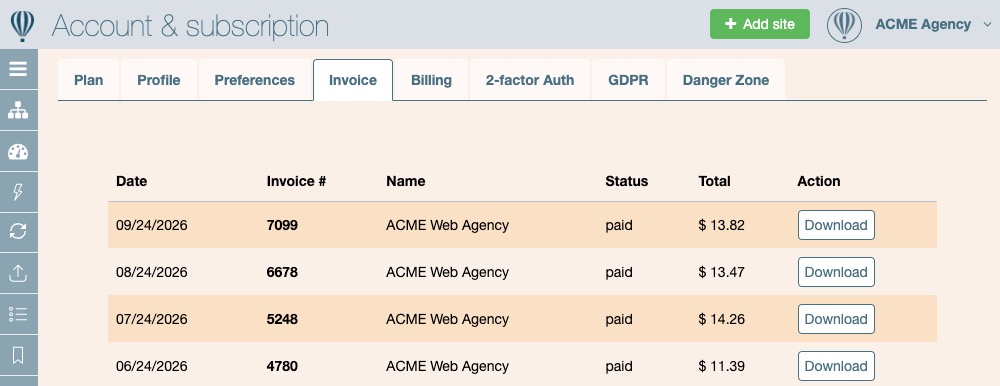
Invoices. - Your invoices are displayed in a table, with the most recent invoices at the top.
For each invoice, Watchful displays:
DateInvoice #NameStatusTotalAction
Download an invoice
To download a copy of an invoice:
- Find the invoice you need in the
Invoicelist. - Click
Downloadin theActioncolumn for that invoice.
You can repeat this process for any previous invoice in your account.
The Status column also lets you confirm whether an invoice has been paid, while the Total column shows the amount of the invoice.
Need to update the information on future invoices?
The company name, address, VAT number, and other billing information used on your invoices can be updated separately in Billing settings.
Update your billing information before your next invoice is generated if you need different company or tax details to appear on future invoices.