The Watchful Vulnerability Scanner checks your WordPress and Joomla! sites for security risks, configuration problems, vulnerable software, suspicious files, malware, and other potential issues.
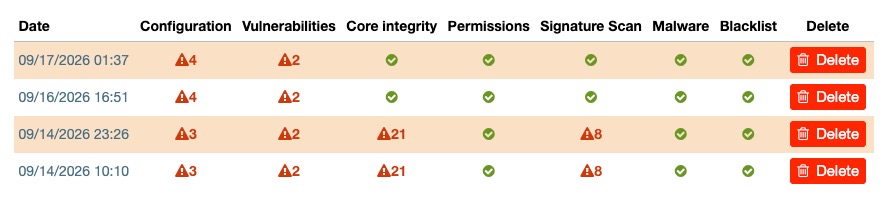
Results from each vulnerability scan are stored in Watchful so you can review previous results, repeat scans, and monitor changes over time.
What the Vulnerability Scanner checks
A vulnerability scan includes the following checks:
- Configuration and security best practices
- Known core and plugin vulnerabilities
- Core filesystem integrity
- File and folder permissions
- Malware signatures
- Frontend malware
- Blacklist status
Configuration and security best practices
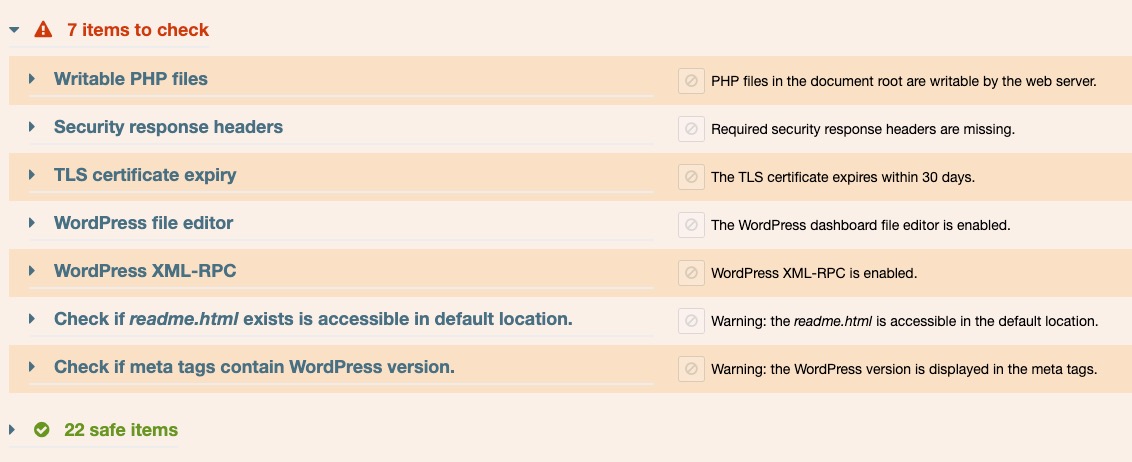
The configuration and security best practices scan checks your site against common security and configuration best practices.
If Watchful detects a problem with your website or server configuration, the issue is displayed in the scan results so you can investigate and correct it.
Depending on your CMS and server configuration, Watchful checks for the following:
- Unsupported PHP versions.
- Presence of two-factor authentication for user logins.
- Presence of the
Strict-Transport-Securitysecurity header. - Presence of the
X-Frame-Optionssecurity header. - Presence of the
Content-Security-Policysecurity header. - HTTPS enforcement and certificate expiry.
- Presence of web-accessible
.zipor.sqlarchives in the document root. - Presence of backend file editors.
- Exposed XML-RPC.
- Enabled debug notices/debug mode.
- Properly configured
robots.txt. - The use of known administrator usernames.
- The presence of
.htaccessorweb.config. - Known database table prefixes.
- Additional CMS installations.
- Session lengths longer than 15 minutes.
- Search engine friendly URLs.
- Enabled error reporting/display.
magic_quotesenabled.mod_zlibavailabilitymod_xmlavailability- Presence of well-known backup restoration scripts.
- Unsafe PHP
maximum_executiontimes. - Presence of installation directories.
- Use if GZIP page compression.
- Use of page caching.
- Changes to configuration files.
- Availability of guest user registration.
- Presence of debug log files.
- Availability of directory browsing in the uploads folder.
- The presence of deactivated plugins or extensions.
- The presence of deactivated themes.
- The presence of the default
readme.htmlfile. - Safe file permissions for configuration files.
- Availability of theme updates.
- Inappropriate information revealed during failed login attempts.
- Database debug mode.
- PHP version information exposed in HTTP headers.
- WordPress version information in meta tags.
- The presence of WordPress security keys and salts.
Known core and plugin vulnerabilities
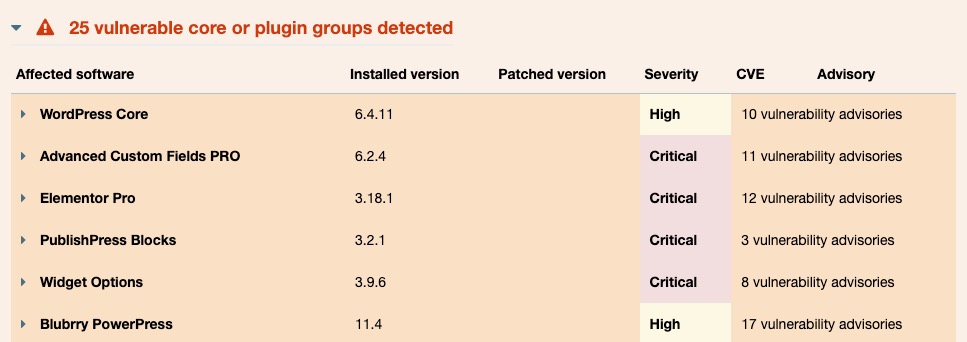
Watchful checks for known vulnerabilities affecting WordPress and Joomla! core software and installed plugins and extensions.
Detected vulnerabilities are included in the scan results so you can identify affected software and determine what action is required.
Important: Known core and plugin vulnerability detection requires Watchful Premium.
Core filesystem integrity
The core filesystem integrity scan checks whether files distributed as part of WordPress or Joomla! core have been modified or are missing.
If Watchful detects a difference, the affected file path is displayed in the scan results. You can then investigate the change and replace the file with an original copy when appropriate.
File and folder permissions
File and folder permissions determine who can read, modify, or execute files on your server.
Common permissions for PHP-based content management systems include:
0644for individual files0755for folders
The file and folder permissions scan checks the files and folders in your WordPress or Joomla! installation. Files or folders with unexpected permissions are flagged in the scan results.
Malware signatures
The malware signatures scan performs a deep, server-side scan of your site’s filesystem for common malware signatures and suspicious code.
If suspicious code is detected, Watchful displays the affected file and the suspicious pattern in the scan results.
Note: False positives can occur with signature scanners. Review suspicious files carefully and contact the relevant software vendor if you are unsure whether detected code is legitimate.
Malware scanner
The malware scanner checks the public-facing portion of your website for signs of malicious or suspicious content. Since the frontend of your website may contain compiled code and scripts/assets from third-party sites, this scan is important for monitoring overall security on your website.
The malware scanner checks for issues including:
- Website malware
- Injected spam
- Website defacements
- Internal server errors
Blacklist scanner
The blacklist scanner checks whether your site has been identified as unsafe by external security services.
Watchful checks the following services:
- Google Safe Browsing
- McAfee
- Sucuri Labs
- ESET
- PhishTank
- Yandex
- Opera
A blacklist result should be investigated promptly.
Ignore detected issues
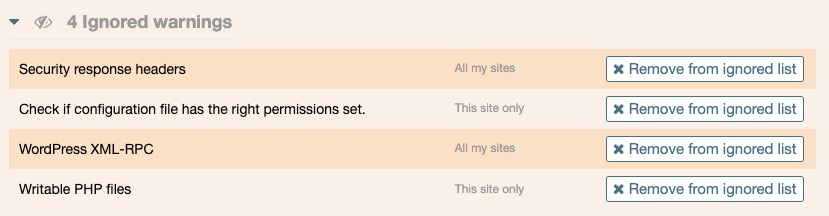
Not every detected issue requires action. For example, you may determine that a particular result is expected for your site or represents a risk you have chosen to accept.
Watchful allows you to ignore a detected issue:
- On a single site
- Across all sites in your Watchful dashboard
Important: Ignoring an issue does not resolve the underlying condition. Only ignore a result after reviewing it and determining that no action is required.
Automate vulnerability scans
You can run vulnerability scans manually whenever you need them.
Watchful Premium also allows you to automate vulnerability scans so your sites are checked regularly without starting each scan manually.
Important: Automated vulnerability scans require Watchful Premium.
Scan history and retention
Watchful stores vulnerability scan results so you can review previous scans and monitor changes over time.
Scan results are retained according to your Watchful plan:
| Plan | Retention |
|---|---|
| Free | 7 days |
| Legacy | 30 days |
| Premium | 90 days |
Troubleshooting
If a vulnerability scan does not complete successfully, see Troubleshooting the Vulnerability Scanner.