Major Upgrades to Watchful’s Vulnerability Scanner
Keeping your websites secure means staying one step ahead of emerging threats. That’s why we’ve made some major improvements to the Watchful Vulnerability Scanner, giving you more powerful tools to identify security risks across your WordPress and Joomla! websites.
These upgrades introduce improved malware detection, comprehensive checks for known software vulnerabilities, automated scanning, and intelligent security notifications.
Here’s what’s new.
1. Revamped audit of configuration and best-practices
We’ve worked hard to modernize our analysis of a site’s configuration and best practices. Obsolete checks were removed along with the unnecessary tracking of some server/host details. We’ve also removed duplicate checks (like unexpected changes in critical system files) which are monitored elsewhere.
Finally, we’ve simplified some checks to make it more clear how to resolve outstanding issues.
2. Improved malware detection and website reputation checks
We’ve replaced our legacy Sucuri-based scanning tools with new, in-house solutions for malware detection and website reputation monitoring.
The updated malware scanner helps identify suspicious or malicious code that could indicate a compromised website. Our website reputation checks identify sites associated with phishing, malware, and other known online threats.
Bringing these checks into our own scanning infrastructure gives us greater control over how security risks are detected, reported, and maintained.
Improved privacy is another important benefit. Malware and reputation checks now run on Watchful’s own, GDPR-compliant infrastructure, without sending your website’s data to third-party scanning APIs. This keeps the scanning process under our control and reduces unnecessary sharing of website information with external services.
Both improvements are integrated directly into the existing Vulnerability Scanner, alongside checks for file integrity, permissions, and security best practices.
3. Identify known vulnerabilities in WordPress and Joomla! software
One of the most significant improvements is the addition of known vulnerability detection for WordPress and Joomla! core software, plugins, and extensions.
Watchful now checks your installed software against databases of publicly disclosed security vulnerabilities, commonly identified by CVE (Common Vulnerabilities and Exposures) identifiers.
This means Watchful can alert you to a known security vulnerability affecting a specific version of an installed plugin, extension, or CMS core, even when your website appears to be operating normally.
With this information available directly in the scan results, you can identify affected software and prioritize updates before attackers have an opportunity to exploit known weaknesses.
Known vulnerability detection is available to Watchful Premium users.
4. Automated vulnerability scans — Early Access
Until now, vulnerability scans had to be started manually. We’re changing that.
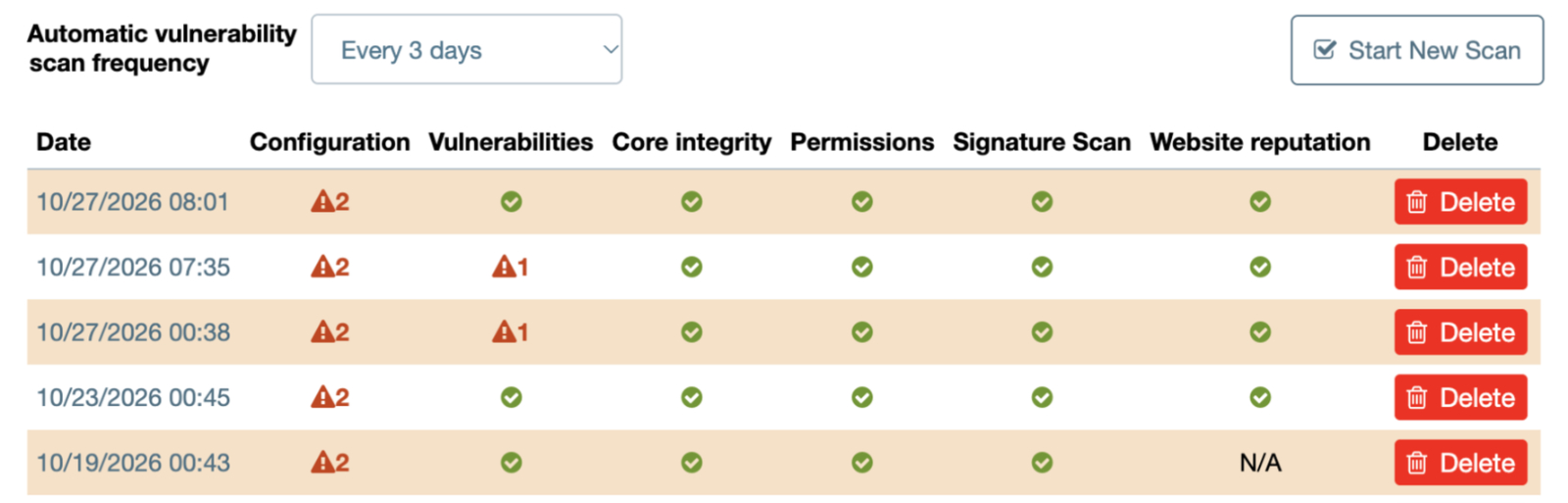
Watchful can now automatically scan your websites every three days, helping you identify potential security issues without having to remember to initiate a scan.
Prefer more frequent checks? You can adjust the scanning interval to run daily. Scan intervals are configured separately for each website, and automatic scanning can also be disabled when needed.
Automated scanning runs independently of manual audits, so you can continue to launch vulnerability scans whenever you need them.
Sites in Watchful Premium accounts will begin automated vulnerability scans once they join the Early Access program.
5. Intelligent security notifications — Early Access
Regular security scans are useful, but knowing when something gets worse is even better.
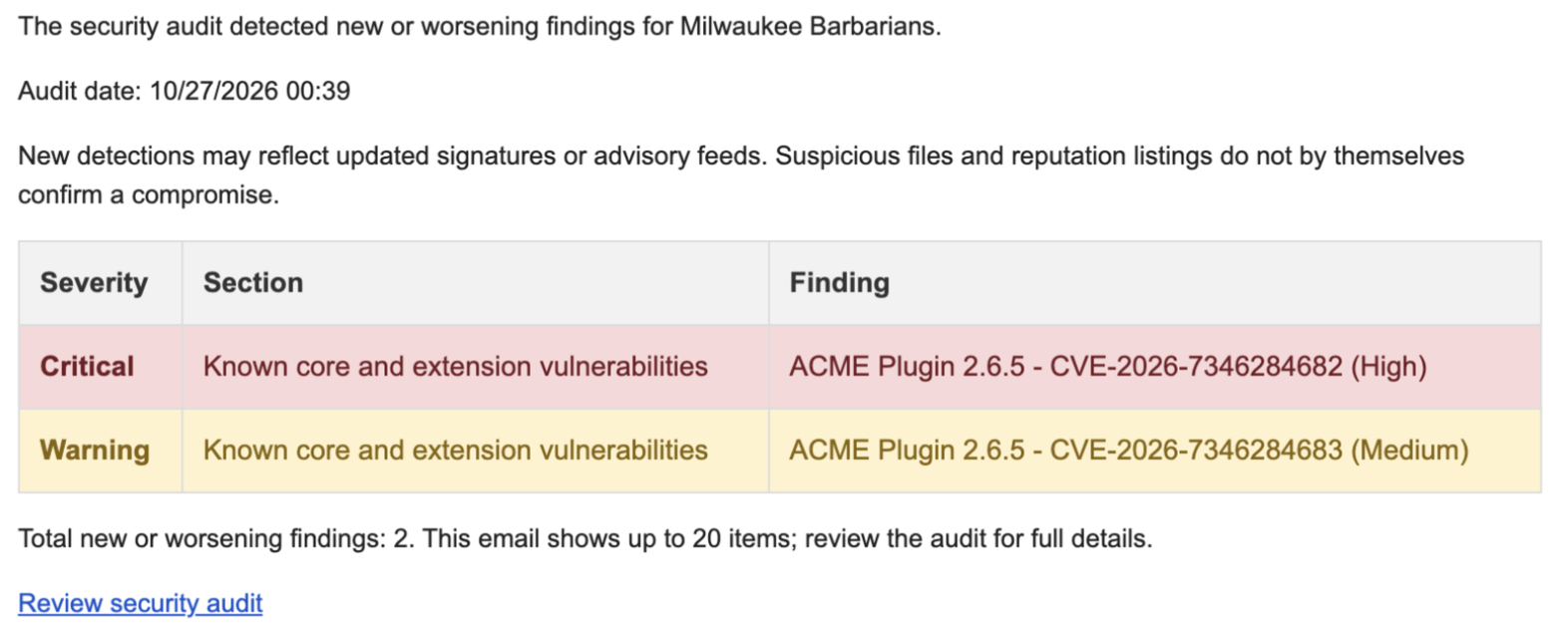
We’ve added a new, intelligent notification system that alerts you when a vulnerability scan detects a negative change in your website’s security.
Rather than sending an email after every scan, Watchful compares the latest results with previous findings and only sends a notification when a new or worsening issue is detected.
For example, you might receive an alert when:
- A new vulnerability is discovered in an installed plugin or extension.
- A previously resolved security issue reappears.
- A security configuration check identifies a new problem.
- A malware or reputation check detects a new threat.
If the results haven’t changed, or previously identified problems have been resolved, there’s no unnecessary email.
The first scan after enabling notifications establishes a baseline, so you won’t receive an initial alert about existing issues.
Security notifications are disabled by default. To receive these alerts, you must explicitly enable security audit emails in your Watchful Notification settings.
This feature is also part of our Early Access program.
Get started with the upgraded Vulnerability Scanner
The improved malware and reputation checks are available in the Vulnerability Scanner, while known CVE detection is included with Watchful Premium.
To try automated scanning and intelligent security notifications, join the Early Access program from Account & subscription → Preferences → Early access to new features.
Once enrolled, you can configure automatic scanning for your websites and opt in to security notifications.
For a complete explanation of every check, how results are interpreted, and how to configure these features, see our Vulnerability Scanner documentation.
These enhancements mark an important step forward for Watchful’s website security tools. Similar to automated Lighthouse scans, daily vulnerability scanning helps you move beyond occasional security audits toward continuous, proactive monitoring of the websites you manage.


0 Comments