Monitor website performance with Google Lighthouse
A fast, accessible, and search-friendly website delivers a better experience for your visitors. Watchful’s performance monitoring tools help you measure website quality, identify problems, and track improvements over time.
Powered by Google Lighthouse, Watchful automatically monitors your websites every week, records historical performance scores, and alerts you when significant performance problems are detected.
Whether you manage one website or hundreds of client sites, Watchful makes website performance monitoring part of your regular maintenance workflow.
Monitor more than just website speed
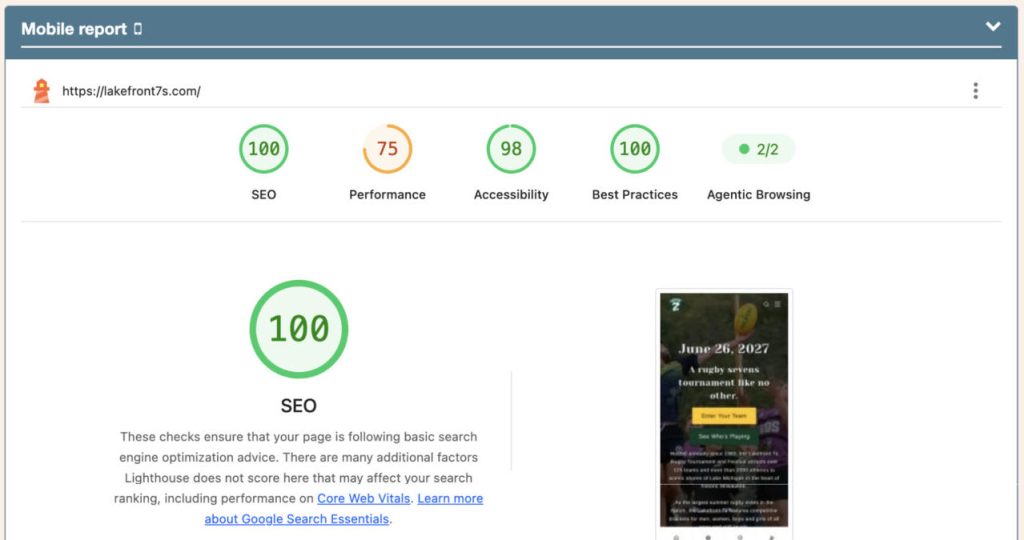
Watchful uses Google Lighthouse to evaluate four important aspects of website quality:
- Performance: Measure page loading speed, responsiveness, and visual stability to understand how visitors experience your website.
- Accessibility: Identify potential barriers that make your website difficult to use for people with disabilities.
- Best Practices: Detect technical issues involving security, browser compatibility, and modern web development standards.
- SEO: Identify technical issues that may affect how search engines discover and understand your website.
Each category receives a score from 0 to 100, making it easy to identify areas that need attention.
Watchful evaluates mobile and desktop performance separately, helping you detect problems that might affect visitors using different devices.
Automatic performance monitoring
Website performance can change without warning. A plugin update, a new image, or a third-party script can introduce problems that go unnoticed until visitors start complaining.
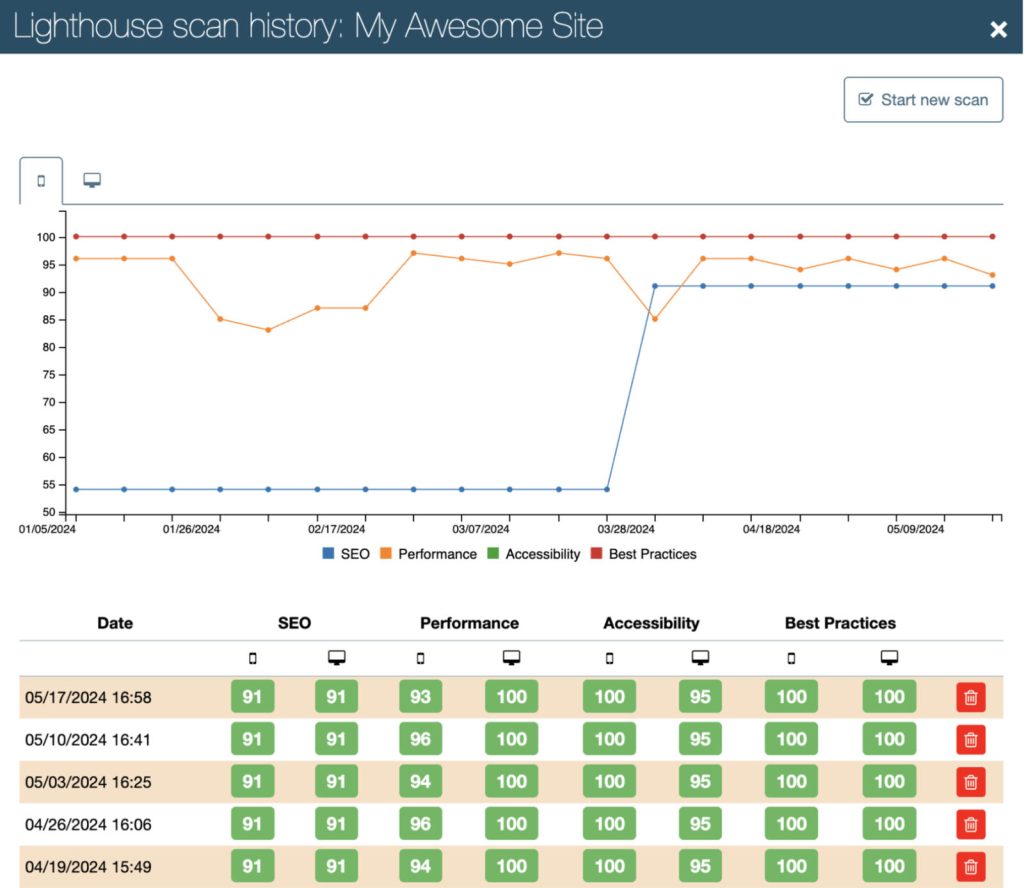
Watchful automatically runs Google Lighthouse scans and records the scores for Performance, Accessibility, Best Practices, and SEO.
These historical results help you:
- Identify performance problems after website updates.
- Track changes in website quality over time.
- Compare mobile and desktop performance.
- Measure the impact of optimization efforts.
- Detect recurring problems before they become larger issues.
Interactive charts and scan history make it easy to identify trends and compare current results with previous measurements.
Get notified when performance drops
You shouldn’t have to check your websites every day to discover performance problems.
Watchful can automatically notify you by email when a Lighthouse scan detects a significant decline in website performance.
Rather than alerting you about every small fluctuation, Watchful compares the latest Performance score with previous results and identifies meaningful changes.
Mobile and desktop performance are monitored independently, so you can identify problems affecting a particular type of visitor.
Performance drop notifications are optional and can be enabled in your Watchful notification settings.
Detailed reports and actionable recommendations
When a problem is detected, Watchful helps you investigate.
Run a manual Lighthouse scan directly from your Watchful dashboard to generate a detailed technical report. Each report includes individual audits, performance measurements, and recommendations for improving website quality.
For example, Lighthouse can help identify:
- Oversized or poorly optimized images.
- Unused JavaScript and CSS.
- Resources that delay page rendering.
- Unexpected layout shifts.
- Accessibility problems.
- Technical SEO issues.
Detailed performance measurements, including Largest Contentful Paint (LCP), Total Blocking Time (TBT), and Cumulative Layout Shift (CLS), help you understand what is affecting your website’s loading experience.
After making improvements, run another scan to measure the results.
Performance monitoring for website agencies
For agencies managing multiple WordPress and Joomla! websites, maintaining website quality is an ongoing responsibility.
Watchful brings performance monitoring into the same dashboard you already use to manage updates, security, backups, and other maintenance tasks.
Historical Lighthouse results help you demonstrate the value of ongoing website maintenance, investigate problems following updates, and prioritize improvements across your client websites.
You can also include Lighthouse results in Watchful’s client reports, helping clients understand how their websites perform and the work being done to improve them.
Privacy-focused website performance monitoring
Watchful runs Lighthouse audits on its own GDPR-compliant infrastructure.
Your audit results remain within Watchful’s infrastructure. Watchful does not send your audit data to Google or use Google’s APIs to perform Lighthouse scans.
This approach lets you benefit from Google’s open-source Lighthouse technology while maintaining greater control over your website’s audit data.
Create your 100% free account today. No commitment. No credit card required.